Why this calculator asks more than the others
Almost every bulking calculator online runs the same equation on height, weight, age and sex. This one runs on your lean body mass, which is the tissue actually burning the calories.
Most calorie apps are built for weight loss. The gain setting is the same math pointed the other way: same assumptions, same blind spots, all of it designed for someone trying to eat less. If you've spent six months failing to gain inside one of them, that's the reason.
The standard tool is the Mifflin-St Jeor equation. Four inputs, one activity multiplier, done. It's fine, and it's everywhere, but it's estimating your lean mass from your height because it has nothing better to work with. Two men at 5'10" and 175 lb get the same number whether one is a lifter at 12% body fat and the other has never trained.
Ask about body fat instead and the guesswork disappears. That's the Katch-McArdle equation, and it's what this calculator uses. Which is why there's no height field on this page. It doesn't need one.
Movement and training are counted separately
Most calculators collapse your entire life into a single "activity level" dropdown, which forces a desk worker who lifts four times a week and a warehouse worker who never trains into the same bucket. Here they're two questions, because they're two different things. Steps scale your resting burn. Training adds calories on top, sized to your bodyweight and how hard you can actually push a session.
Your surplus gets adjusted, not just added
The surplus starts from the rate you picked, at roughly 7,700 calories per kilogram gained. Then it moves: leaner bodies handle a bigger surplus before it turns to fat, and someone who's been slowly losing weight needs more of a push to flip the trend than someone already creeping upward. If you've been heavier before, your body has some memory of it, and the number reflects that too.
There's a ceiling on muscle, and it's lower than most people think
Your body can only build so much muscle in a month, no matter how much you eat:
- Beginner: about 0.9 kg, or 2 lb
- Intermediate: about 0.45 kg, or 1 lb
- Advanced: about 0.2 kg, or half a pound
Women build at roughly half these rates, and the ceiling drops about 1% a year after 30. That's why the rate options above stop where they do. Eating for a rate your body can't use doesn't add muscle. It adds fat.
What to do with the number
Eat it, consistently, for two to three weeks. Then look at what the scale did, not what it did on any single day.
- Gaining in range? Nothing to change. Keep going and raise the target as your bodyweight climbs.
- Scale flat after three weeks? Your real maintenance is higher than the formula guessed. Add 150–200 calories and give it another two weeks. Stuck longer than that? Read why you can't gain weight.
- Gaining much faster than your rate? Pull back by a similar amount. Fast gain past your muscle ceiling is fat you'll have to diet off.
That loop is the whole game, and it's also where nearly everyone falls off. Doing it by hand means weighing daily, averaging honestly, remembering what you ate three weeks ago, and adjusting without overreacting to a bad Monday.
This number is a starting guess
Worth being blunt about: every calorie calculator, including this one, is a population average wearing your inputs. It has never seen your metabolism. Two people with identical entries on this page can differ by several hundred calories a day in real life, and no formula can tell you which one you are.
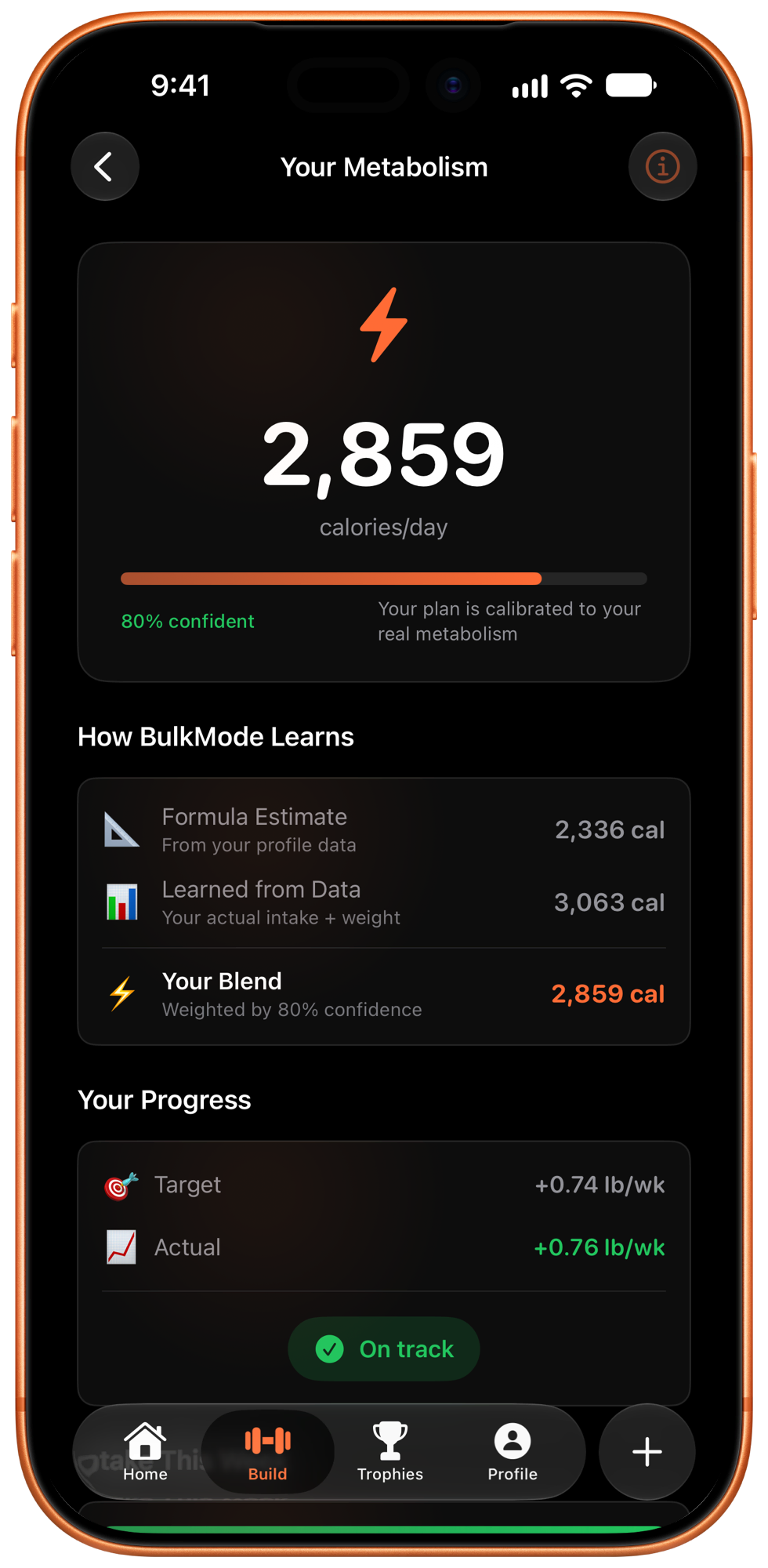
What settles it is data. Once there are a few weeks of intake and weigh-ins to compare, your real maintenance stops being a guess and becomes something you can measure. That's what BulkMode is doing in the background:
- The first couple of weeks: it runs the same number this page just gave you.
- From around week three: it starts comparing what you actually ate against what your weight actually did.
- From around week eight: your target comes from your own data instead of the formula's assumptions, and it keeps moving as you grow.
That's the learning. Separately from it, the app eases you in: you start below the full target and step up through five levels, which is the "Ease into it" switch above. Hit your target a few days and you move up early; if not, it steps up about once a week. It's a deliberate on-ramp, because a bulk you quit on day three isn't a bulk. For the reasoning behind the numbers, read how many calories to bulk; for choosing the rate you plugged in above, clean bulk vs. dirty bulk; for the whole method, how to bulk the right way.
The part after the calculator.
You now have a number. The hard part is the eight weeks that follow it.
- Snap it or say it. Calories and macros in seconds, even for the meal you already ate.
- A target that moves with you. It starts where this page did, then learns your real maintenance from your weigh-ins.
- See the trend, not the noise. The scale wobbles day to day. Your real progress doesn't.
- No guilt for eating. No red warnings, no shame. Hitting your calories is a win, not a problem.